
Google Disco Browser: The Revolutionary AI Browser That Turns Tabs into Custom Apps in 2025

Introduction
Google Disco browser is changing how we interact with the internet in 2025. If you’re tired of juggling dozens of browser tabs for simple tasks like research, trip planning, or learning new topics, this article is for you.
This comprehensive guide is designed for tech enthusiasts, digital marketers, students, professionals, and anyone who wants to maximize their productivity online. The browser tab overload problem affects millions of users daily, leading to decreased productivity, confusion, and wasted time.
In this article, you’ll discover what Google Disco is, how its groundbreaking GenTaps feature works, why it matters for everyday browsing, and how you can get early access. We’ll break down everything you need to know about this experimental AI browser that’s positioning itself as a serious competitor to ChatGPT and Perplexity.
Table of Contents
What is Google Disco Browser?
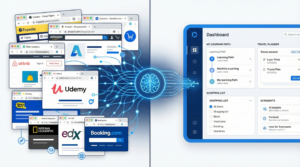
Google Disco browser represents a fundamental shift in how we experience the internet. Unlike traditional browsers that simply display web pages in separate tabs, Disco is an experimental AI-powered browser that intelligently combines information from multiple sources and transforms them into unified, interactive applications.
The core philosophy behind Google Disco is simple yet revolutionary: instead of forcing users to manually navigate between tabs, copy information, and piece together insights, the browser does this work automatically using advanced artificial intelligence.
The Problem Disco Solves
Consider a typical research scenario. When learning about a complex topic like the solar system, most users would:
- Open Wikipedia for basic information
- Launch YouTube for visual explanations
- Access educational websites for detailed articles
- Search for interactive models
- Bookmark multiple resources for later reference
This fragmented approach leads to several problems:
- Tab overload – Managing 10-20 open tabs simultaneously
- Information silos – Data scattered across different sources
- Cognitive burden – Mental effort to synthesize information
- Time waste – Switching between tabs and reorganizing data
- Lost context – Forgetting where specific information was found
Google Disco eliminates these problems by reading, understanding, and consolidating your browsing activity into cohesive, actionable applications.
Understanding GenTaps Technology
GenTaps is the proprietary technology powering Google Disco’s revolutionary capabilities. The name combines “Generative” and “Tabs,” perfectly describing its function: generating interactive applications from your browser tabs.
Summary
GenTaps is powered by Gemini 3, Google’s most advanced AI model. It analyzes the content across all your open tabs, understands the relationships between different pieces of information, and creates a unified interactive experience without requiring any coding or technical setup from the user.
Key Features of GenTaps
- Intelligent tab analysis – Reads and comprehends content from multiple tabs simultaneously
- Context understanding – Identifies relationships between different information sources
- Natural language interaction – Responds to conversational commands
- Dynamic app generation – Creates custom applications on-the-fly
- Real-time updates – Adapts as you add new tabs or information
- Zero-code requirement – No programming knowledge needed
- Cross-source integration – Combines text, video, images, and interactive elements
How GenTaps Works
Step 1: Open Your Browser Tabs
Start by opening the various websites, articles, videos, and resources related to your task or topic of interest.
Step 2: Activate GenTaps
Use a simple command or natural language prompt to tell Disco what you want to accomplish.
Step 3: AI Analysis
Gemini 3 processes all tab content, identifying key information, patterns, and relationships.
Step 4: App Generation
The system creates a custom, interactive application that consolidates all relevant information.
Step 5: Interact and Refine
Use the generated app, make changes, and refine it using natural language commands.
Use Cases and Benefits
| Use Case | Traditional Approach | With GenTaps |
|---|---|---|
| Learning new topics | Multiple tabs, manual note-taking | Single interactive learning app |
| Trip planning | Separate booking sites, spreadsheets | Unified trip planning dashboard |
| Research projects | Scattered documents, bookmarks | Consolidated research workspace |
| Homework assistance | Multiple resources, manual compilation | Integrated study application |
| Shopping comparison | Many product tabs, manual comparison | Automated comparison tool |
Pros and Cons of GenTaps
| Pros | Cons |
|---|---|
| Eliminates tab overload completely | Currently in limited beta/waitlist |
| No coding or technical skills required | Requires stable internet connection |
| Powered by advanced Gemini 3 AI | May have learning curve initially |
| Works with any type of content | Privacy considerations with tab reading |
| Saves significant time and effort | Full feature availability unclear |
| Natural language interaction | Dependent on AI accuracy |
| Creates truly interactive experiences | Browser compatibility limitations |
How Google Disco Works
Understanding the technical workflow of Google Disco helps users maximize its potential. Here’s a detailed breakdown of how this AI browser transforms your browsing experience.
The Complete Workflow
1. Installation and Setup
Google Disco is installed as a standalone browser or browser extension. The setup process is designed to be straightforward, requiring minimal configuration.
2. Natural Language Commands
Unlike traditional browsers that rely on clicks and navigation, Disco responds to natural language. Users can type or speak commands like:
- “Help me learn the solar system with a 3D interactive model”
- “Plan a week-long trip to Japan within $3000 budget”
- “Compare the top 5 smartphones under $800”
- “Create a study guide for my biology exam”
3. Intelligent Processing
The Gemini 3 AI engine:
- Scans all open tabs for relevant content
- Identifies key data points and relationships
- Determines the best format for presenting information
- Generates interactive elements based on content type
4. App Generation
The output isn’t just a summary—it’s a fully functional, interactive application that may include:
- 3D models and visualizations
- Interactive timelines
- Booking capabilities
- Comparison charts
- Embedded videos and media
- Actionable buttons and forms
5. Continuous Interaction
Users can continue refining their generated apps through:
- Follow-up commands
- Direct modifications
- Adding new information sources
- Sharing and collaboration features
Key Features of Google Disco Browser
Conversational Interface
Talk to your browser like you would talk to a human assistant. There’s no need to learn specific commands or navigate complex menus. Simply describe what you want to accomplish.
Tab Consolidation
The browser intelligently reads and combines information from all your open tabs into unified, coherent applications. This eliminates the mental load of tracking multiple sources.
No-Code App Creation
Create functional, interactive applications without writing a single line of code. The AI handles all the technical complexity behind the scenes.
Real-Time Actions
Beyond just organizing information, Disco enables real actions:
- Book travel reservations
- Make purchases
- Schedule appointments
- Send communications
- Complete forms
Gemini 3 Integration
Powered by Google’s most advanced AI model, Disco benefits from:
- Superior language understanding
- Advanced reasoning capabilities
- Multimodal processing (text, images, video)
- Contextual awareness
- Continuous learning and improvement
Cross-Platform Content Integration
Whether your sources include text articles, YouTube videos, social media posts, e-commerce listings, maps and location data, or documents and PDFs, Disco can read, understand, and integrate them all.
Real-World Use Cases
Educational Applications
Learning Complex Topics
Instead of juggling multiple educational resources, students can:
- Open various learning materials
- Request an interactive learning experience
- Receive a consolidated app with 3D models, quizzes, and summaries
- Study more efficiently with all resources unified
Homework and Research
Students working on assignments benefit from:
- Automatic source compilation
- Citation management
- Visual presentation creation
- Study guide generation
Travel Planning
Complete Trip Organization
Travel planning typically requires flight comparison websites, hotel booking platforms, activity and tour sites, restaurant recommendations, map applications, and budget spreadsheets.
With Google Disco, users can consolidate everything into one trip planning application that allows:
- Side-by-side comparisons
- Direct booking within the app
- Budget tracking
- Itinerary creation
- Local recommendations
Professional Applications
Business Research
Professionals conducting market research can:
- Combine competitor information
- Create analysis dashboards
- Generate reports automatically
- Track industry trends
Project Management
Teams can consolidate project resources, communication channels, task lists, and documentation all in one unified interface.
Google Disco vs ChatGPT vs Perplexity
The emergence of Google Disco raises important questions about how it compares to existing AI tools. Here’s a comprehensive comparison.
Feature Comparison Table
| Feature | Google Disco | ChatGPT | Perplexity |
|---|---|---|---|
| Primary Function | AI browser with app generation | Conversational AI chatbot | AI search engine |
| Tab Integration | Yes, reads and combines tabs | No native tab reading | Limited browser extension |
| Interactive Apps | Creates custom apps | Text-based responses | Text with citations |
| Real-Time Actions | Booking, purchases, forms | No direct actions | No direct actions |
| Source Integration | Multiple tabs simultaneously | Single conversation context | Web search results |
| No-Code App Creation | Yes | No | No |
| AI Model | Gemini 3 | GPT-4 | Various models |
| Browser Integration | Native browser | Separate application | Browser extension |
| Visual Elements | 3D models, interactive charts | Limited visual output | Text-focused |
| Real-Time Web Access | Yes, through tabs | Limited (with browsing) | Yes, web search |
When to Use Each Tool
Choose Google Disco when:
- You need to consolidate multiple web resources
- You want interactive, visual applications
- You require direct actions like booking or purchasing
- Your task involves complex research across many sources
Choose ChatGPT when:
- You need conversational assistance
- You’re working on writing or content creation
- You want detailed explanations of concepts
- You need coding or technical help
Choose Perplexity when:
- You need quick, cited answers
- You want real-time web search results
- You prefer source transparency
- You need fast fact-checking
Competitive Advantages of Google Disco
- Native browser integration – No need for separate applications
- Tab-aware AI – Understands your current browsing context
- Action capabilities – Can complete tasks, not just inform
- Visual output – Creates interactive, visual applications
- Google ecosystem – Potential integration with other Google services
How to Join the Google Disco Waitlist
As of 2025, Google Disco remains in an experimental phase with limited access. Here’s how to position yourself for early access.
Current Availability Status
- Status: Experimental/Waitlist
- Access: Limited beta testing
- Geographic Availability: Likely starting with select regions
Steps to Join the Waitlist
- Visit the official Google Labs page for experimental projects
- Sign in with your Google account
- Look for Disco in the experimental features section
- Submit your interest by joining the waitlist
- Enable notifications for updates on availability
Tips for Getting Early Access
- Participate in Google’s other experimental programs
- Provide feedback on existing Google products
- Follow official Google AI and Chrome channels
- Join relevant developer communities
- Stay updated through Google’s official announcements
The Future of AI Browsers
Google Disco represents just the beginning of AI-powered browsing. Here’s what this technology signals for the future of the internet.
Predicted Developments
Short-Term (2025-2026)
- Expanded Disco availability
- Competitor responses from Microsoft, Apple, and others
- Integration with more Google services
- Enhanced GenTaps capabilities
Medium-Term (2026-2028)
- AI browsers becoming mainstream
- Traditional browsers adding AI features
- New paradigms for web design optimized for AI reading
- Voice-first browsing experiences
Long-Term (2028+)
- Fundamental changes to how websites are built
- AI-mediated internet experiences as the norm
- Personalized, dynamic web applications for every user
- Seamless integration between browsing and task completion
Impact on Various Industries
| Industry | Potential Impact |
|---|---|
| E-commerce | AI-mediated shopping experiences |
| Education | Personalized learning applications |
| Travel | Integrated trip planning and booking |
| Research | Automated literature reviews and synthesis |
| Healthcare | Patient information consolidation |
| Finance | Unified financial management tools |
Conclusion
Google Disco browser with its revolutionary GenTaps technology represents a significant leap forward in how we interact with the internet. By transforming scattered browser tabs into unified, interactive applications, this experimental AI browser addresses one of the most common frustrations of modern web browsing.
The combination of Gemini 3’s advanced AI capabilities with practical, no-code app generation creates possibilities that extend far beyond what traditional browsers or even current AI tools like ChatGPT and Perplexity offer. From educational applications to travel planning and business research, Disco’s potential applications are vast.
If you’re interested in experiencing this future of browsing firsthand, joining the waitlist now positions you for early access. Stay connected with Google’s official channels, and prepare to fundamentally change how you use the internet.
Ready to transform your browsing experience? Join the Google Disco waitlist today and be among the first to experience the next generation of AI-powered internet browsing.
Last Updated: 2025