
How to Get Gemini AI Pro Version Free in 2025: Complete Step-by-Step Guide
Gemini AI Pro version free access is now possible through a lesser-known feature in the MyJio app. If you’re a Jio user looking to unlock premium AI capabilities without paying the subscription fee, this guide is specifically for you.
Artificial intelligence tools have become essential for students, professionals, and content creators. However, premium AI subscriptions can be expensive for many users. The good news is that Jio has included Gemini AI Pro access as part of certain plans, and through family sharing, up to five people can benefit from a single subscription.
In this comprehensive blog, you’ll learn exactly how to access Gemini AI Pro for free, understand the family sharing process, and discover how to maximize this opportunity before it potentially ends.
Table of Contents
- What is Gemini AI Pro?
- Understanding the Jio Gemini AI Pro Free Offer
- How to Get Gemini AI Pro Free Through MyJio App
- Step-by-Step Process to Send Family Invitation
- How to Accept Gemini AI Pro Invitation
- Important Settings to Enable
- Gemini AI Pro Features and Benefits
- Comparison: Gemini AI Free vs Pro Version
- Conclusion
What is Gemini AI Pro?
Gemini AI Pro is Google’s advanced artificial intelligence model that offers significantly enhanced capabilities compared to the free version. This premium tier provides users with faster response times, priority access during peak hours, and access to the most advanced AI model available.
Key Features of Gemini AI Pro
- Advanced AI Model Access: Uses Google’s most capable AI model for better accuracy
- Longer Context Windows: Process and remember more information in conversations
- Priority Access: No waiting during high-traffic periods
- Enhanced Creativity: Better outputs for creative writing and content generation
- Improved Coding Assistance: More accurate code generation and debugging
- Multimodal Capabilities: Better image understanding and generation
How Gemini AI Pro Works
- Users subscribe to Google One AI Premium plan
- Access is granted through Google account
- Premium features unlock across Gemini app and web interface
- Integration with Google Workspace apps becomes available
Use Cases for Gemini AI Pro
Students
Research assistance, essay writing, exam preparation
Professionals
Email drafting, report generation, data analysis
Developers
Code writing, debugging, documentation
Content Creators
Script writing, idea generation, content optimization
Business Owners
Market research, customer communication, planning
Pros and Cons of Gemini AI Pro
| Pros | Cons |
|---|---|
| Access to most advanced AI model | Usually requires paid subscription |
| Faster response times | Limited availability in some regions |
| Priority access during peak hours | Requires Google account |
| Better accuracy and creativity | Internet connection required |
| Integration with Google apps | Learning curve for new users |
Understanding the Jio Gemini AI Pro Free Offer
Jio has partnered with Google to provide Gemini AI Pro access as a bundled benefit for certain Jio users. This partnership allows eligible Jio subscribers to access premium AI features without purchasing a separate Google One AI Premium subscription.
How This Offer Works
The Gemini AI Pro free offer through Jio operates on a family sharing model. One primary user with an eligible Jio plan can share their Gemini AI Pro access with up to five additional family members or friends.
Eligibility Criteria
- Must have an active Jio connection with eligible plan
- Requires MyJio app installed on smartphone
- Need a valid Gmail account
- The invitation sender must have Gemini AI Pro access enabled
⚠️ Why This Opportunity is Limited
This Gemini AI Pro free access through Jio may not remain available indefinitely. Promotional partnerships between telecom companies and tech giants often have time limitations. Acting quickly ensures you don’t miss out on this valuable opportunity.
How to Get Gemini AI Pro Free Through MyJio App
Getting Gemini AI Pro version free requires coordination between someone who already has access and those who want to receive it. Here’s the complete breakdown of the process.
Prerequisites Before Starting
📱 For the person sending invitation:
- Active Jio plan with Gemini AI Pro benefit
- Updated MyJio app
- Gemini AI app installed
- Active Gmail account linked
📧 For the person receiving invitation:
- Valid Gmail account
- Gemini AI app installed on device
- Stable internet connection
Finding Someone with Gemini AI Pro Access
If you don’t have direct access to Gemini AI Pro through your Jio plan, you’ll need to find someone who does. This could be:
- Family members with eligible Jio plans
- Friends using Jio postpaid or premium prepaid plans
- Colleagues with Jio connections
Step-by-Step Process to Send Family Invitation
For users who have Gemini AI Pro access through their Jio plan, here’s how to share it with others:
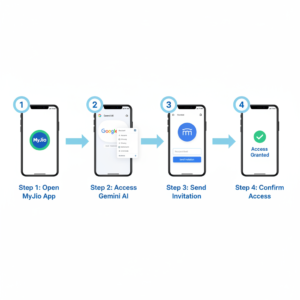
Step 1: Open Gemini AI App
Launch the Gemini AI application on your smartphone. Ensure you’re logged in with the Google account that has Pro access enabled.
Step 2: Access Settings
Look for the menu icon or settings option within the Gemini AI app. This is typically represented by three horizontal lines or a gear icon.
Step 3: Navigate to Manage Subscription
Within the settings menu, find and tap on “Manage Subscription” option. This section controls your Gemini AI Pro subscription details.
Step 4: Select Send Invitation Option
After entering the subscription management area, look for “Manage” followed by “Send Invitation” option. This feature allows you to share your Pro access.
Step 5: Enter Recipient’s Email
Type the Gmail address of the person you want to invite. Double-check the email for accuracy before proceeding.
Step 6: Send the Invitation
Tap the “Send” button to dispatch the invitation. The recipient will receive an email notification about the shared access.
How to Accept Gemini AI Pro Invitation
If you’ve received an invitation to join someone’s Gemini AI Pro family plan, follow these steps:
Step 1: Check Your Gmail
Open your Gmail inbox and look for an email from Google regarding Gemini AI Pro family sharing invitation.
Step 2: Review Invitation Details
Read through the invitation email to understand what access you’re receiving and who sent it.
Step 3: Confirm the Invitation
Click on the confirmation button or link within the email. This action accepts the invitation and links your account.
Step 4: Verify Access
Open the Gemini AI app and check if Pro features are now available. You should see indicators showing premium access.